
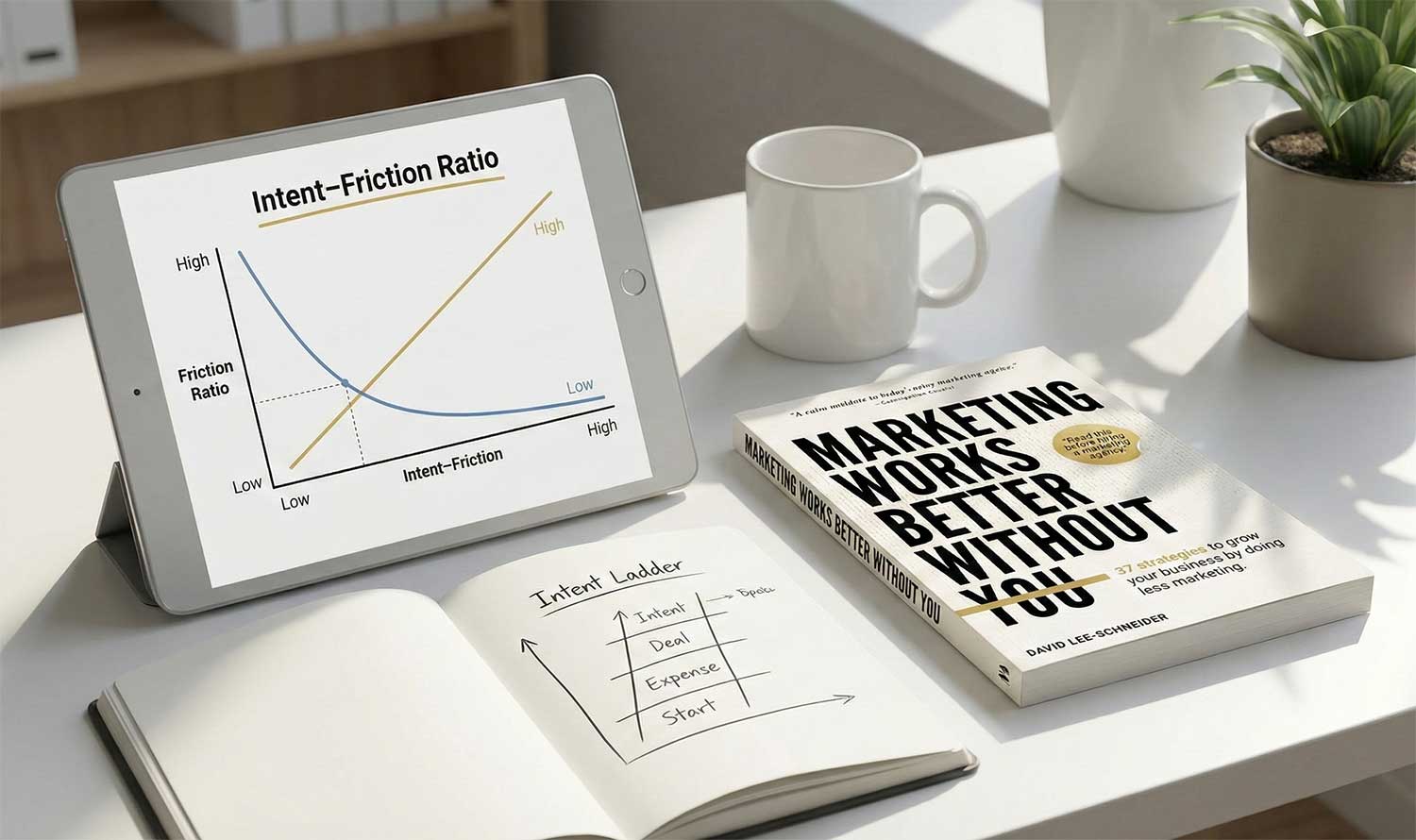
Most marketing advice is obsessed with traffic. More clicks. More impressions. More eyeballs. That is rarely the real problem. The real problem usually appears later, when someone is already interested and the website quietly makes it harder than it needs to be to move forward. That gap is what I call the intent-friction ratio.

I first introduced the intent-friction ratio in my book Marketing Works Better Without You, after seeing the same conversion pattern repeat across hundreds of websites.

What the intent-friction ratio means

Every visitor arrives with a certain level of intent. That intent might be vague curiosity or it might be a clear readiness to act.

At the same time, every website introduces friction. Friction is the effort required to move forward.

  • Pages to navigate
  • Forms to fill out.
  • Decisions to make.
  • Language to interpret.
  • Uncertainty to resolve.

The intent-friction ratio is simply the relationship between those two forces.

When motivation is high and effort is low, conversion feels easy.

When motivation is high and effort is high, people stall or disappear.

When motivation is low and effort is low, people may stay engaged.

When motivation is low and effort is high, nothing happens.

Most conversion problems come from a mismatch, not from a lack of interest.
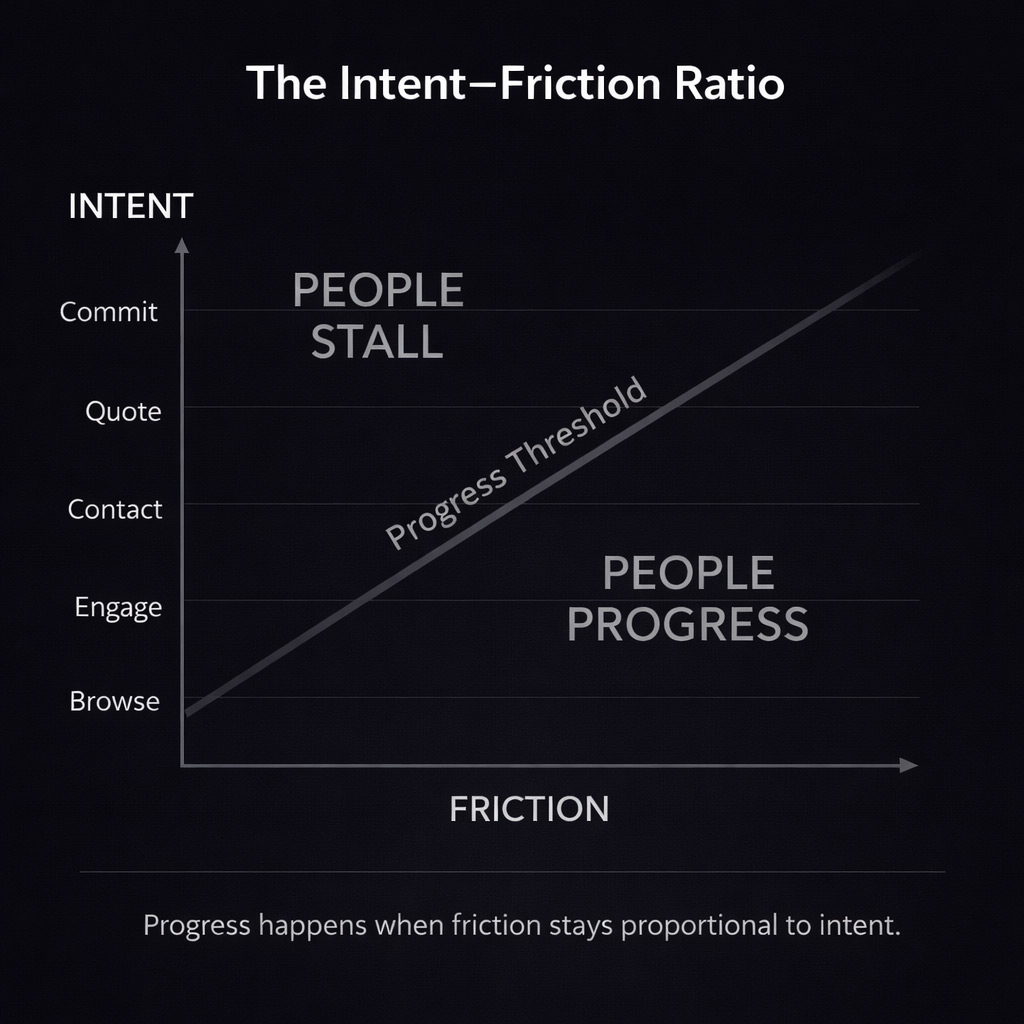

The Intent-Friction Ratio: Conversion Is a Balance Between Motivation and Effort


The intent ladder

To understand the ratio, it helps to understand intent itself.

Not everyone arrives in the same state of mind.

  • Some people are exploring.
  • Some are comparing.
  • Some are ready to move.

You can think of this as an intent ladder.

At the top, intent is low. People are learning and orienting themselves.

In the middle, intent is forming. People are evaluating options.

At the bottom, intent is high. People want to take a next step.

The mistake most websites make is treating everyone the same, regardless of where they are on that ladder.

Why friction is not always bad

Friction gets a bad reputation, but friction is not the enemy.

Friction is only a problem when it is out of proportion to intent.

A detailed enquiry form can be perfectly reasonable for someone who is ready to engage. The same form feels exhausting to someone who is just trying to understand a problem.

The issue is not how much friction exists.

The issue is when and where it appears.

Practical example one. Contact forms

Someone searches for “web designer near me”.

That is a strong signal of intent.

If they land on a page with a short, clear form that asks only what is needed to start a conversation, the ratio feels right.

If they are asked for budgets, timelines, internal approvals, marketing goals and long explanations before they have spoken to a human, the ratio breaks.

Their motivation was high, but the effort demanded even more.

Now compare that with someone reading an article about why websites struggle to convert.

That person is early stage.

A light next step like a short email sign up makes sense. A full contact form does not.

Same form. Different intent. Very different outcome.

Practical example two. Service pages

Many service pages try to do everything at once.

  • They educate.
  • They sell.
  • They qualify.
  • They reassure.
  • They close.

This creates friction because the page is unclear about who it is for.

A high intent service page should prioritise clarity, reassurance and direction. Not long explanations.

An early stage page should reduce pressure and offer a way to continue without commitment.

One page. One dominant intent level.

Practical example three. Pricing pages

Pricing pages are one of the clearest signals of elevated intent.

If someone clicks on pricing, they are already leaning forward.

Hiding prices behind calls or forcing people through long explanations adds friction at exactly the wrong moment.

The job of a pricing page is not to persuade someone that pricing exists. It is to help them decide whether it fits.

How to use the intent-friction ratio

You do not need more tactics. You need better alignment.

For every page on your site, ask one question.

What level of intent does someone have when they land here?

Then ask a second.

Does the effort I am asking for match that intent?

If those two are out of sync, conversion will always feel harder than it should.

Why this matters

When you design with the intent-friction ratio in mind, something shifts.

  • You stop pushing people who are not ready.
  • You stop slowing down people who are.
  • You remove obstacles instead of adding persuasion.

Marketing becomes quieter, simpler and more effective.

In my experience, that is where the real gains usually are.
If you’ve ever felt like your website should be performing better but can’t quite put your finger on why, there’s a good chance the problem is your services page.

Not your design.
Not your SEO.
Not your offers.
Your services page.

Here’s the uncomfortable truth:
Most services pages are built for the business, not the buyer.

They look tidy, they feel efficient, they feel complete, because they list every single service a business offers in one place. But for the person browsing, it’s like reading a menu in a language they don’t speak.

This disconnect is so common—and so costly—that it led me to find a new approach.

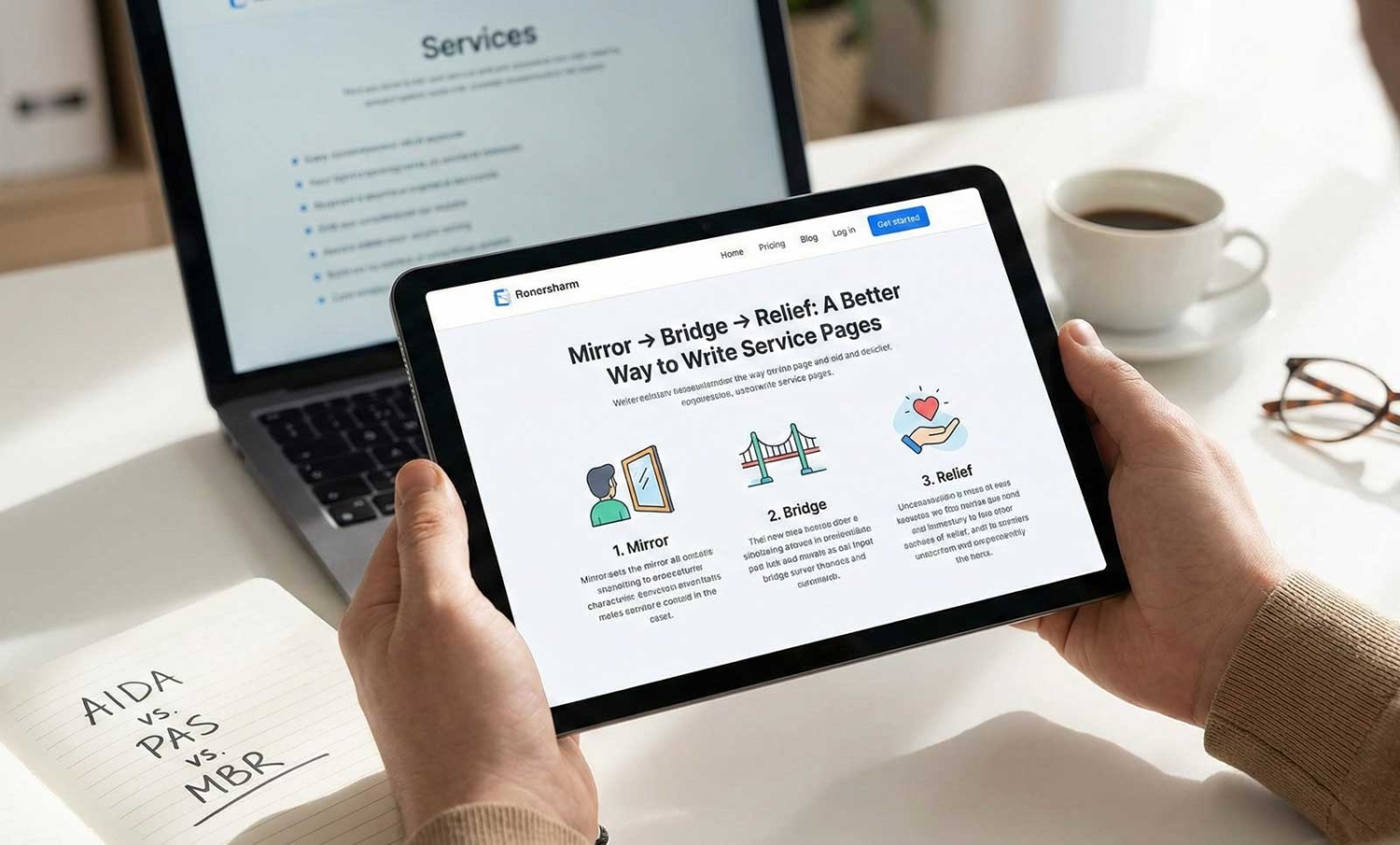
It’s called the Mirror → Bridge → Relief method (MBR), and it flips the traditional structure of service pages on its head.

Why MBR Was Created

MBR came out of something simple: noticing where traditional service pages often fall short.

Many business owners do everything right. They list their services clearly, organise them on one tidy page, and check all the boxes. But the page still doesn’t convert. Because it doesn’t connect.

The problem isn’t effort. It’s perspective.

People don’t come to your website thinking in terms of services. They come with a specific problem they want to solve. When your copy doesn’t reflect that, confusion or hesitation creeps in.

Popular copywriting frameworks like AIDA and PAS are effective for ads and sales pages, but they often feel out of place on service websites, especially when visitors are looking for clarity, not persuasion.

That’s where MBR fits in. It’s a structure designed to help potential customers feel understood from the moment they land on the page. It focuses on empathy and guidance, not hype or hard selling.

What Is the MBR Formula?

The MBR framework is how you write a dedicated service page that converts uncertain visitors into confident buyers—without sounding like a sales pitch.

It has three parts:

1. Mirror

You start by describing the problem from the customer’s point of view. Their frustration. Their confusion. Their hesitation. You speak their language, like a friend who’s been there.

2. Bridge

Then you explain why the problem exists and why it’s not their fault. You bridge the gap between their situation and your solution, building trust along the way.

3. Relief

Finally, you show what life looks like on the other side of the problem. You paint the picture of relief and ease, and then introduce your service as the natural next step.

No hype.
No jargon.
Just one real problem, one clear outcome, and one human conversation.

How It’s Different (and Better)

Let’s compare briefly:

Formula Works Best For Risk
AIDA Ads, emails, urgency-driven offers Can feel manipulative if overused
PAS Landing pages, direct sales Escalates tension, doesn’t always work in services
MBR Service pages, human-led offers, trust-based decisions Slower burn but deeper trust

AIDA gets attention. PAS pushes for action.
MBR builds understanding and lowers resistance.

When someone lands on your website looking for help, your job isn’t to “sell” them.
It’s to make them feel safe moving forward.

Why One Page Per Problem Wins

Here’s the shift most businesses never make:

Instead of one page that lists all your services, you create one page per problem your customers are trying to solve.

You don’t write “Plumbing”.
You write “Tap Won’t Stop Dripping?”

You don’t write “Hair Treatments”.
You write “Hair That No Longer Feels Like Yours?”

Each page mirrors one situation, builds one bridge, and delivers one form of relief.

This isn’t just better for conversions, it’s better for your customer.
Because instead of working hard to decode your website, they immediately feel seen.

And when someone thinks, “This is exactly what I’m dealing with”, the hesitation disappears.

How to Start Using MBR

This doesn’t mean rewriting your entire website. Start small:

  • Pick your top 3 services or problems you solve regularly.
  • Create a dedicated page for each using the MBR structure.
  • Speak to the problem, not the product.
  • Keep the tone clear, calm, and conversational.

Remember: you’re not writing for Google. You’re writing for a real person who’s already a little overwhelmed.

When done right, these pages become your silent salespeople helping customers feel understood before they ever contact you.

Final Thought

AIDA and PAS have their place. But in today’s trust-driven, service-based economy, people don’t need to be pushed, they need to be seen.

The MBR formula helps you do exactly that.

And once you start writing service pages this way, you’ll never go back to listing everything in bullet points and hoping something sticks.

You’ll be building pages that actually move people forward.

Customer retention is not just a nice-to-have; it’s a critical aspect of sustainable success. In an increasingly competitive marketplace, where acquiring new customers can be costly and challenging, retaining your existing customers is a game-changer. So, let’s delve into the secrets of customer retention and discover practical strategies that will make your customers stick around for the long haul.

Understanding the Value of Customer Retention

Having worked with dozens of business owners across various industries, I understand the importance of customer loyalty and how it can transform your business. So, let’s embark on this journey of customer retention and discover strategies that are simple yet effective.

Nurturing Existing Customers: Your Business’s Hidden Goldmine

When it comes to growing your business, don’t overlook the goldmine that lies within your existing customer base. These loyal customers are more likely to make repeat purchases, refer others to your business, and become your brand advocates. By focusing on customer retention, you can tap into their immense value and boost your bottom line.

Measuring Success: Key Metrics for Customer Retention

To gauge the effectiveness of your customer retention efforts, it’s essential to track the right metrics. Keep an eye on customer churn rate, repeat purchase rate, and customer lifetime value. These metrics will provide valuable insights into the success of your strategies and guide your decision-making process.

Let’s use an example of a dance studio called “Twinkle Toes Dance Academy to explain each of these three metrics.”

Customer churn rate: Customer churn rate is the percentage of dance students who stop attending classes at your studio over a specific period of time. For example, if Twinkle Toes Dance Academy had 50 students at the beginning of the month, but by the end of the month, 10 of them did not continue their enrollment, the customer churn rate for that month would be 20%.

Repeat purchase rate: Repeat purchase rate is the percentage of students who continue taking dance classes at your studio for multiple sessions or terms. If Twinkle Toes Dance Academy had 100 students in a term, and 70 of them enrolled for the next term, the repeat purchase rate would be 70%.

Customer lifetime value: Customer lifetime value is the total value a dance student brings to your studio over the entire duration of their enrollment. Let’s say the average student at Twinkle Toes Dance Academy pays $100 per month and stays with the studio for 2 years. The customer lifetime value would be $100 x 12 months x 2 years = $2,400.

The goal is to increase our repeat purchase rate and customer lifetime value, while keeping the customer churn rate at a minimum.

Building Strong Relationships with Your Customers

The long-term success of a business is a reflection of the relationships it has with its customers.

Personalisation: Creating Memorable Experiences

Customers appreciate a personal touch. Take the time to understand their needs, preferences, and pain points. By segmenting your audience and tailoring your communication and offerings accordingly, you can create experiences that resonate with each customer on a personal level.

Going Above and Beyond: The Power of Exceptional Customer Service

Delivering exceptional customer service is a game-changer in customer retention. Train your team to provide prompt, empathetic, and proactive support. By exceeding expectations, you create a positive impression that lingers in the minds of your customers, fostering loyalty and trust.

Rewarding Loyalty and Encouraging Repeat Business

Loyalty Programs: Incentives that Delight

Implementing a well-designed loyalty program can keep your customers coming back for more. Offer rewards, exclusive discounts, and special perks to thank them for their loyalty. These incentives show appreciation and make customers feel valued, strengthening their connection with your brand.

Exclusive Treats: Making Customers Feel Like VIPs

Go the extra mile to make your loyal customers feel special. Offer exclusive offers, early access to new products, or personalised recommendations. By making them feel like VIPs, you create a sense of exclusivity and deepen their emotional connection to your brand.

Engaging Your Customers for Long-Term Success

Crafting Compelling Email Campaigns

Email marketing remains a powerful tool for customer engagement. Create engaging campaigns that provide value, such as personalised content, exclusive promotions, and helpful tips. Through regular communication, you’ll stay top of mind and foster ongoing relationships with your customers.

Building a Vibrant Social Media Presence

Social media offers endless opportunities for customer engagement. Cultivate a strong presence on platforms relevant to your audience and actively interact with them. Respond to comments, address concerns, and share valuable content. By building an online community, you foster authentic connections and strengthen customer relationships.

Listening and Adapting to Customer Feedback

Gathering Insights: The Power of Customer Feedback

Your customers hold valuable insights that can shape the future of your business. Encourage them to share feedback through surveys, reviews, and direct communication. These insights will provide guidance for improving your products, services, and customer experience.

Taking Action: Implementing Customer Feedback

Collecting feedback is only valuable if you take action based on the insights gained. Actively address concerns, make necessary improvements, and communicate these changes to your customers. By showing that you value their feedback and act upon it, you build trust and loyalty.

By implementing these strategies and nurturing strong relationships with your customers, you’ll unlock the true potential of your business. Remember, customer retention is not just about transactions; it’s about building lasting connections and creating loyal brand advocates. Embrace the power of customer retention, and watch your business thrive in the hands of satisfied and devoted customers.

Ready to take your business to the next level? Schedule a free growth strategy session with me today! Together, we’ll develop a tailored marketing strategy that suits your unique business needs and helps you achieve sustainable growth. Let’s embark on this journey of customer loyalty and unleash the full potential of your business.

Hey there, it’s David! Today, I received a question from one of you about a common problem when sharing your website on social media, particularly on Facebook. Sometimes, the preview of the page doesn’t look appealing, and that’s where this little trick comes in handy. In this blog post, I’ll walk you through the exact steps to update the website preview image when sharing your WordPress posts and pages on Facebook.

Step 1: Install the Yoast SEO Plugin

The easiest way to customise your website’s preview on Facebook is by using the Yoast SEO plugin. If you haven’t installed it yet, head over to your WordPress website’s plugins section, click “Add New,” and search for “Yoast SEO.” Install and activate the plugin.

Step 2: Access the Yoast SEO Meta Box

Once Yoast SEO is activated, scroll to the bottom of any page or blog post (in this case, the homepage editor). You’ll notice a new Yoast SEO box. Normally, Yoast SEO helps with Google search results, but it also has a “Social” tab specifically for Facebook.

Step 3: Customise the Title, Description, and Image

Click on the “Social” tab within the Yoast SEO meta box. Here, you can specify a new title, description, and image for Facebook sharing. Upload your desired image and write a compelling description that suits your post/page. This way, when you share the link on Facebook, it will display the updated preview with the new image and description.

Step 4: Updating Previously Shared Links

If you’ve shared the link before and the old image still appears, you need to update the link’s information on Facebook. Facebook “scrapes” your website for images and descriptions, and sometimes, it saves them on their server. To update this, you can use the Facebook Sharing Debugger tool.

Step 5: Using the Facebook Sharing Debugger

Visit the Facebook Sharing Debugger tool. Enter your updated link into the tool, and Facebook will scrape your website again, retrieving the latest images and descriptions. This ensures that the new image and description show up everywhere the link is shared.

Updating the website preview image when sharing on Facebook is a simple process with the help of the Yoast SEO plugin and the Facebook Sharing Debugger tool. By customising the title, description, and image specifically for Facebook, you can make your posts and pages stand out and engage your audience better. Give it a try, and you’ll see the difference it makes!

Frequently Asked Questions About Facebook Preview Image

Here are some common questions I received after sharing this video, which I thought would be good to answer here.

I was hoping I wouldn’t have to download a whole plugin just for this feature… Is there a way to manually code it into the site?

Manually coding the website preview image into the site is possible, but it requires technical knowledge and coding skills. The Yoast SEO plugin offers a user-friendly solution for non-technical users to easily customize the preview image. However, if you prefer manual coding, you can consult with a web developer to implement the necessary code changes to achieve the desired preview image on Facebook.

Putting it in the “Featured Image” spot on WordPress is supposed to do it, but for some reason mine isn’t working properly. Any solutions?

If the “Featured Image” spot on WordPress is not working properly for setting the Facebook preview image, it could be due to theme or plugin conflicts. Ensure that your theme supports this feature and that there are no conflicting plugins. Alternatively, you can try using a different plugin specifically designed for setting the Facebook preview image.

What if the debug doesn’t work? Facebook is still pulling up the old preview even after correctly customizing Yoast social.

If the Facebook Sharing Debugger tool doesn’t update the old preview, it could be because Facebook’s caching system is still serving the old data. In such cases, you can try the following steps: 1. Use the “Scrape Again” feature in the Facebook Sharing Debugger tool multiple times. 2. Wait for some time (usually a few hours) as Facebook’s caching system may take time to refresh.

How long does it take for these changes to take effect?

The changes made to the website preview image using the Yoast SEO plugin usually take effect immediately. However, it may take some time for Facebook’s caching system to update and reflect the changes across all platforms and devices. If you don’t see the changes immediately, give it some time or use the Facebook Sharing Debugger tool to force the update.

Are there any other plugins or tools that can help customise the preview image and description for Facebook sharing?

While Yoast SEO is a popular plugin for optimising website preview images, there are alternative plugins available that offer similar functionality. Some popular alternatives include All in One SEO Pack, Rank Math, and SEOPress. You can explore these plugins to find the one that best suits your needs and offers the ability to customise the preview image for social media sharing.

How can I optimise my website preview image for other social media platforms like Twitter?

Each social media platform may have specific requirements and best practices for optimising website previews. Yoast SEO also offers the option to specify a seperate preview image for Twitter and LinkedIn. To optimise your website for other platforms like Twitter, LinkedIn, or Pinterest, you can refer to their respective developer documentation or support resources to learn about the recommended image sizes, meta tags, and other guidelines for customising the website preview. Additionally, there are plugins available that cater specifically to certain social media platforms, allowing you to fine-tune the preview image and description for each platform individually.

If you found this tutorial helpful, let me know in the comments below. For more insightful marketing tips and strategies, stay tuned to my blog. And remember, if you need any further assistance or have questions, feel free to reach out. I’m here to help you with everything marketing.

Thanks for reading, and see you soon!

Want to optimise your website for sustainable business growth? Claim your free 17 point website checklist to discover the must-have elements every business website needs.

Are you struggling to increase your website’s conversion rates? Have you ever considered using conditional logic to simplify your forms and keep your visitors engaged? If not, then buckle up! In this blog post, we’ll show you an effective technique to enhance your online forms and improve your conversion rates.

The Problem with Long Forms

We all know that having a form on your website is crucial. It could be for a free download, strategy session, or webinar registration. But sometimes, you may want to capture more information than just a first name and an email address.

However, the longer your form gets, the more likely people are to abandon it, causing you to lose potential leads. This is where conditional logic comes into play.

What is Conditional Logic?

Conditional logic is a technique that changes the form’s process based on user input. It presents different fields to the user depending on their previous answers. This way, you can gather all the necessary information without overwhelming your visitors.

A Real-Life Example

Let’s take a look at a real-life example to see conditional logic in action. Redland Dance, a client from Queensland, Australia was offering free trial classes on their website. Since they cater to both children and adults, they needed a form that could differentiate between inquiries for kids and adult classes.

To address this issue, we created a drop-down menu that allowed users to specify who they were inquiring for. If a user selects “adult,” they only see two fields to fill out, keeping the form simple and easy. However, if they select “child,” additional fields appear to capture the child’s name, age group and parent’s information.

This way, the form slowly unfolds as users progress, and the business collects all the information needed to deliver a great customer experience.

Conditional logic is a powerful tool to improve your website’s form conversion rates. By personalising the form-filling process, you can keep your visitors engaged and collect the essential information you need to grow your business and deliver a great customer experience.

Have you used conditional logic in your business to simplify a form or process? Let me know in the comments below!

As a small business owner, it’s easy to get overwhelmed with managing multiple platforms and marketing tools. That’s why it’s important to have the right tools in place to help your marketing run consistently and effortlessly. In this episode of David’s Dose of Marketing, I share three tools that are absolute must-haves for any small business owner looking to streamline their marketing strategy and free up their time.

1. Social Media Management Tool

Having a social media management tool is crucial to schedule and manage your social media accounts effectively. Although there are numerous scheduling tools available, some of them limit the number of posts you can schedule. However, there are other social media scheduling tools that allow you to recycle posts. This game-changing feature ensures that your posts repeat after a certain amount of time, saving you time and effort. By recycling your posts, you can focus on creating other types of content while still engaging with your audience.

FREE DOWNLOAD: The Ultimate Blueprint To Automating Your Social Media Content

2. Email Automation Tool

Building an email list is essential for any business to stay connected with their customers and nurture leads. Email automation tools can help automate your follow-up process, engagement, and lead nurturing. This tool streamlines communication with your audience, and you can use it to send relevant content that aligns with their interests. By creating an email automation workflow, you can save time and focus on other aspects of your business.

3. Customer Relationship Management (CRM) Software

A CRM tool helps you keep track of your customers’ journey and enables you to send them personalised content based on their buying behavior. This tool allows you to segment your audience, allowing you to send personalised messages that resonate with them. The right CRM tool helps you stay on top of your customer’s needs and keeps them engaged throughout their journey.

There are many different types of CRM software available, and some are even combined with email automation tools. These tools, such as MailChimp, Clixio, ActiveCampaign, and Ontraport, offer an all-in-one solution for your marketing needs.

By utilising these three tools, you can streamline your marketing efforts and focus on other aspects of your business. As a digital marketing consultant, I strongly recommend that small business owners consider these tools to increase efficiency, productivity, and results.

To sum things up, if you’re looking to streamline your marketing strategy, invest in a social media management tool, email automation software, and a CRM that integrates well with your business. By using these tools, you can simplify your marketing processes and save time, allowing you to focus on what you do best.

If you’d like help with creating a marketing strategy that will help your business grow by actually doing less, click here to schedule a free strategy call today.